 Goal
Goal
Learn how to safely access nested object keys in Autom Mate without running into Variable usage error: Key not found.
 When to Use
-
When working with JSON objects or structured data returned from connectors.
-
If some keys may be optional or missing.
-
To avoid null vs error inconsistencies between
object[key]andobject[key][subkey].
 Step-by-Step
-
Direct Key Access
-
Accessing a top-level key:
##object[knownKey]## → returns value or null if not found
-
-
Nested Key Access
-
If the parent key exists but the subkey doesn’t, Autom Mate currently throws:
Variable usage error. Key not found
-
-
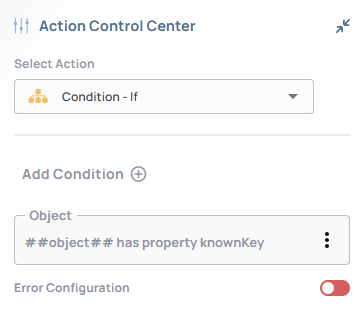
Safe Checking with
ifandhas propertycondition-
Check before accessing deeper levels:
-
 Architecture / Flow
-
Without check →
object[key][subkey]→ throws error ifkeyis missing. -
With safe access → staged lookup →
nullreturned instead of breaking execution.
object ──["key"]──┬── null  → safe return
                  └── object ──["subkey"]──→ value / null
 Validation
-
Test with an object missing the parent key: should not fail.
-
Test with a missing subkey under an existing parent: should return null safely.
 Troubleshooting
-
Error:
Variable usage error. Key not found→ indicates direct nested access without validation. -
Fix: Always check parent key existence before drilling deeper.
 Best Practices
-
Use intermediate variables to simplify nested lookups.
-
Apply
has property conditionbefore accessing deeper levels. -
Treat
nullas an expected safe fallback, not an error.