 Goal
Goal
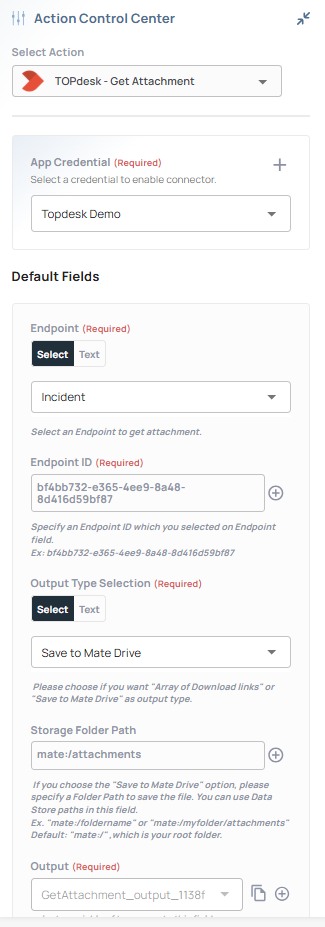
With the release of TOPdesk library v1.7.0, the Get Attachment action has been updated to improve usability, handle large files more gracefully, and provide more flexible output options.
 When to Use
-
When retrieving attachments from TOPdesk incidents & Operator Changes & Operator Changes Activity.
-
When you need to either:
-
Get a list of download links from the API, or
-
Save files directly to Mate Drive for further automation.
-
 What’s New in v1.7.0
 Changes
-
 Removed old
 base64 file contentoutputs (less efficient, harder to manage). -
 Added Output Type Selection with two options:
-
Array of Download Links → returns attachment links from the TOPdesk API.
-
Save to Mate Drive → stores files in a specified folder path in Mate Drive. Output includes file paths for downstream use.
-
-
 Added 60MB file size limit: attachments larger than 60MB are skipped automatically to avoid flow breaks.
 Important Note
Since attachments can now be saved in Mate Drive, remember to add a “Delete from Mate Drive” action at the end of your automation to keep storage clean.
 Architecture / Flow
-
Connector: TOPdesk → Get Attachment
-
Output:
-
Option 1:
[ { "downloadUrl": "...", "fileName": "..." } ] -
Option 2:
[ { "file_content": "mate:/attachments/...", "file_name": "..." } ]
-
-
Next Step: Optional cleanup with
Delete from Mate Drive.
Output Examples
Option 1 – Array of Download Links
[
  {
    "description": null,
    "downloadUrl": "/tas/api/incidents/id/11111111-2222-3333-4444-555555555555/attachments/aaaaaaaa-bbbb-cccc-dddd-eeeeeeeeeeee/download",
    "entryDate": "2025-01-15T14:45:30.000+0000",
    "fileName": "test_document.docx",
    "id": "aaaaaaaa-bbbb-cccc-dddd-eeeeeeeeeeee",
    "invisibleForCaller": false,
    "operator": {
      "id": "99999999-8888-7777-6666-555555555555",
      "name": "API, DemoUser"
    },
    "person": null,
    "size": 123456
  }
]
Option 2 – Save to Mate Drive
[
  {
    "entry_date": "2025-02-18T11:20:45.000+0000",
    "file_content": "C:\\Program Files\\DemoApp\\repository\\11111111-2222-3333-4444-555555555555\\dummy_document.docx",
    "file_name": "dummy_document.docx"
  }
]
 Troubleshooting
-
If attachments above 60MB do not appear → check logs; they are automatically skipped.
-
If saving to Mate Drive fails → verify the Storage Folder Path exists (
mate:/attachmentsby default). -
Always ensure Delete from Mate Drive is included if files should not persist.
 Best Practices
-
Prefer download links if you only need references to files.
-
Use Mate Drive only if the automation requires file manipulation.
-
Clean up files with Delete from Mate Drive at the end of flows.
-
Keep folder paths structured (e.g.,
mate:/attachments/incidents).
 Related