The Problem
Every IT team knows the struggle: you’ve got multiple tools discovering devices and assets — Lansweeper, Intune, SolarWinds, Lakeside — each with their own dataset. Then, your ITSM tool has a CMDB that’s supposed to be the “single source of truth.”
Except… it never is.
Assets are out of date. Duplicate records pile up. Manual imports waste hours. And when a ticket comes in, your agents can’t trust the data they see.
 The Solution with Autom Mate
Autom Mate makes CMDB sync automatic and bi-directional. No matter which CMDB or discovery tool you use — and no matter which ITSM platform you rely on — Autom Mate connects the dots.
Here’s the flow:
Any CMDB/Discovery Tool → Autom Mate → Any ITSM CMDB
And it works in reverse too if you need to keep both sides aligned.
 What Does Autom Mate Actually Do?
-
Pull asset data
From any CMDB or discovery platform (Lansweeper, Intune, SolarWinds, Lakeside, or others) using Autom Mate’s prebuilt libraries or API calls. -
Normalize the data
Standardize fields like hostname, IP, serial number, department, or software inventory. -
Decide what to do
-
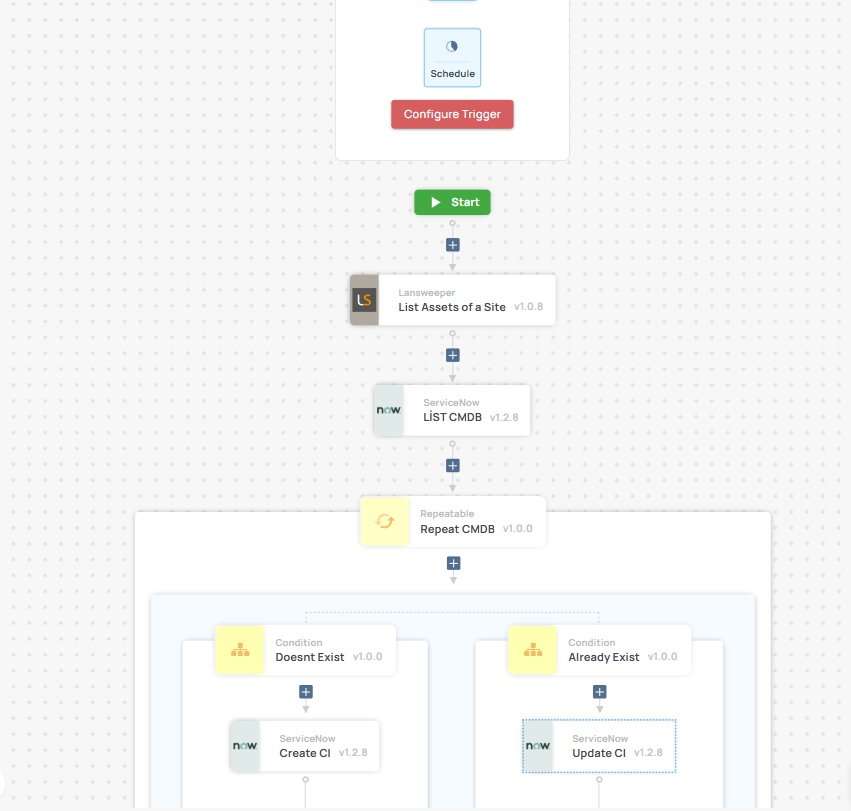
Runbook logic → “If asset exists in CMDB → update; else → create new.”
-
Optional: AI agent to resolve conflicts (e.g., duplicate records across multiple sources).
-
-
Push into any ITSM CMDB
Direct update via Autom Mate’s ITSM libraries (ServiceNow, Jira Service Management, Xurrent, Topdesk, Ivanti, and more). -
Keep it continuous
Run on schedule or trigger on discovery events, so your CMDB always reflects reality.
 Architecture Overview
 Trigger
-
Scheduled job (daily, hourly)
-
Or webhook from discovery tool when a new asset is found
 Data Extraction
- APIs or connectors from any CMDB tool
 Processing
-
Autom Mate transforms data into your ITSM’s CMDB schema
-
AI can help resolve duplicates or missing fields
 Action
- Update/create CI in any ITSM CMDB
 What You Gain
Here’s what organizations typically achieve after deploying ZeroTouch CMDB Sync:
-
 85% less manual effort spent on imports and reconciliation
 -
 95%+ data accuracy across CMDB records
 -
 Real-time updates ensure assets appear in minutes, not days
 -
 75% reduction in duplicate records thanks to automated normalization
 -
 Full visibility for agents: tickets always show up-to-date asset info
Example in Action
-
Lansweeper discovers a new laptop → Autom Mate pulls details (serial, user, OS).
-
Autom Mate checks ServiceNow CMDB → no match found → new CI created.
-
Later, Intune updates the same device with software inventory → Autom Mate updates the existing CI with new data.
-
The same approach works with any discovery tool feeding into any ITSM CMDB.
-
Service desk agents now see complete, accurate asset info directly in their tickets.
 Try It Yourself
This use case can be built with Autom Mate’s ready-to-use connectors, or by calling any CMDB/ITSM API directly.
-
Discovery/CMDB: Lansweeper, Intune, SolarWinds, Lakeside, or any other source
-
ITSM: ServiceNow, Jira SM, Xurrent, Topdesk, Ivanti, or any platform with a CMDB
Set it once → let Autom Mate keep your CMDB clean, fresh, and reliable.
 How are you keeping your CMDB in sync today? Manual imports, custom scripts, or something else? Drop your stories or share your Autom flows