The Problem
Shadow IT is everywhere.
Employees sign up for random SaaS apps with their work email. Someone installs a “productivity booster” on their laptop without telling IT. A manager spins up their own cloud storage account “just for testing.”
Before long, your IT landscape is full of unapproved, unmonitored, and potentially risky apps. Security weakens, compliance suffers, and costs skyrocket with duplicate SaaS subscriptions.
And the worst part? You usually only find out months later.
 The Solution with Autom Mate
Meet Appbusters — an Autom Mate flow that hunts down rogue apps before they can cause trouble.
Here’s the flow:
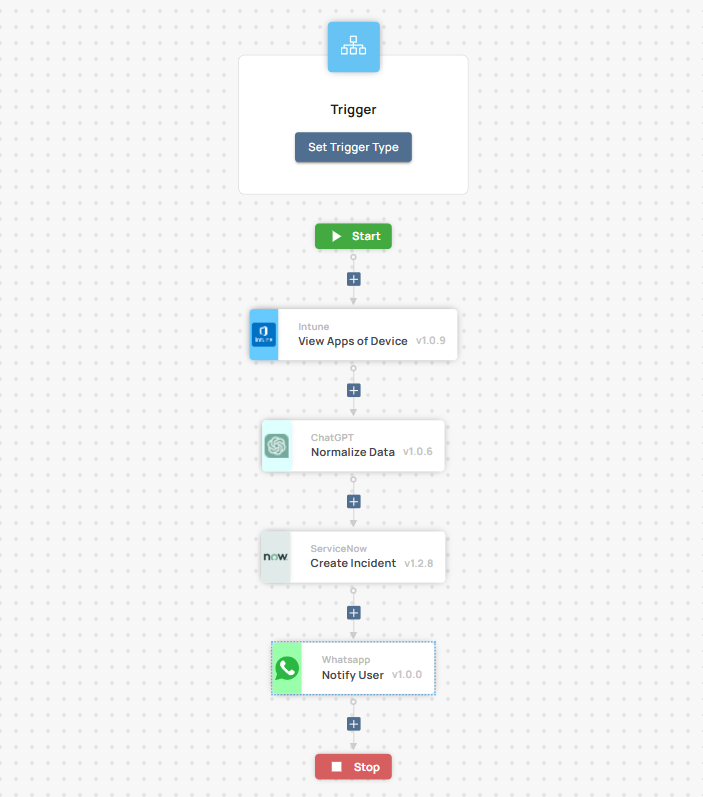
Any Discovery Tool → Autom Mate → ITSM + Teams/Slack
Whether you use Intune, Lansweeper, SolarWinds, Lakeside, or M365 audit logs — Autom Mate turns those detections into instant, automated actions.
 What Does Autom Mate Actually Do?
-
Detects rogue apps or devices
- Pulls events from Intune, Lansweeper, SolarWinds, Lakeside, or Microsoft 365 sign-up logs.
-
Normalizes the data
- Who’s the user? Which device? Which department?
-
Decides what’s next
-
Runbook: “If app not in approved list → escalate”
-
Or AI agent: “This app looks risky, escalate to Security team.”
-
-
Takes action
-
Auto-create ticket in ServiceNow, Jira, Ivanti, Xurrent, or Topdesk
-
Notify IT/security in Teams/Slack
-
Optional: send automated email to user with policy reminder
-
-
Adds intelligence
- AI translates raw event data into plain English:
“Employee John Doe installed Dropbox on LAPTOP-123. This may create a compliance gap for Finance data.”
- AI translates raw event data into plain English:
 Architecture Overview
 Trigger
-
Intune detects new software install
-
Lansweeper scan finds an unrecognized app
-
M365 audit log shows SaaS sign-up
 Decision Layer
-
Runbook conditions (approved vs. unapproved apps)
-
AI scoring for risk level
 Action Layer
-
Create ITSM ticket in your tool of choice
-
Post alert in Teams/Slack with summary
-
Notify user or manager automatically
 What You Gain
-
 100% visibility into apps being installed and signed up for
 -
 Stronger security posture — rogue apps are caught instantly
 -
 Up to 70% fewer compliance violations from unapproved SaaS
 -
 Response time cut by 80% — Autom Mate notifies IT in seconds, not weeks
 -
 Cost savings — eliminate duplicate SaaS subscriptions and shadow licenses
Example in Action
-
Intune logs show employee signs into Dropbox with a work account.
-
Autom Mate pulls the event → checks against approved SaaS list → no match found.
-
Autom Mate creates a ticket in ServiceNow for IT security.
-
Posts in Teams #security-alerts:
“Unauthorized SaaS detected: Dropbox (User: John Doe, Device: LAPTOP-123). Risk: High.” -
User receives an email reminder about SaaS policy.
IT now has full visibility and can take corrective action immediately.
 Try It Yourself
This flow can be built in Autom Mate with:
-
Discovery Tools: Intune, Lansweeper, SolarWinds, Lakeside, Microsoft 365 logs
-
ITSM Tools: ServiceNow, Jira, Ivanti, Xurrent, Topdesk
-
Messaging: Teams, Slack
Set it once → let Appbusters hunt down rogue apps 24/7.
 How do you deal with Shadow IT today? Manual audits? License cleanups? Or do you already have a detection flow?
Drop your stories — or share how you’d extend Appbusters 
 This one is called Appbusters for a reason: it hunts down rogue apps like Ghostbusters hunt ghosts. Only scarier than ghosts are surprise SaaS bills.